|
MS 365 ALERT
|
# 019 – 10/28/2025 | ||
|---|---|---|---|
|
TITLE:
|
State Mobile Device Users Transition to Microsoft Intune MDM—Starting November 3, 2025 | ||
| ALERT: | The State of Delaware is switching from its current Mobile Device Management (MDM) service to Microsoft Intune, a cloud-based solution.
On Monday, November 3, 2025, all State users, whether using personal or state-issued mobile devices, must enroll or re-enroll in the new Microsoft (MS) Intune Company Portal if they access State email, MS Teams, or are enrolled in the current Company Portal. Make sure to allocate time on your Monday morning schedule to complete the necessary steps for enrollment or re-enrollment if either applies to you, as outlined in the “Action” section below. |
||
|
ACTION: |
•Any iOS or Android user not enrolled in the Company Portal who accesses State email or MS Teams will be prompted to enroll. Enrollment information is available here: Install MDM for your Mobile Device
• iOS users enrolled in Company Portal will be prompted to change the passcode on their devices, but no additional steps are necessary.
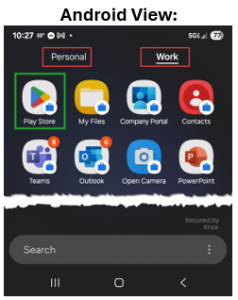
• Android users enrolled in Company Portal will be prompted to re-enroll in the Intune Company Portal app. This process involves several steps. Instructions and a video to guide you through the re-enrollment are available here: Links, Instructions & Video Once Android users transition to the new Company Portal, their devices will segregate Personal Apps from Work Apps. In the Work Apps section, a distinct Play Store icon will be available for downloading Work Apps such as Teams or Outlook.
—————————————————— Distributed and posted on October 28, 2025 |

Any questions or concerns, email Project_O365@delaware.gov.
Email Project_O365@delaware.gov
Delaware's Governor
State Directory
Elected Officials
General Assembly
Delaware Courts
State Employees
Cities & Towns
Delaware State Code
State Regulations
Business First Steps
Phone Directory
Locations Directory
Delaware Public Meetings
Voting & Elections
Transparency
Choose Health DE
Tax Center
Personal Income Tax
Privacy Policy
Weather & Travel
Contact State Agencies
Corporations
Franchise Tax
Gross Receipts Tax
Withholding Tax
Guides to Services
Help Center
Mobile Apps
E-mail / Text Alerts
Social Media


Built by the Government Information Center
©MMXXVI Delaware.gov